





01 Apr How Exclaimer can help centrally manage your company’s email signatures
1. Introduction
Overview
Using a centralised email signature management system (such as Exclaimer) allows organisations to control and maintain employee email signatures from a single point. It can ensure consistent branding and messaging across all business communications.
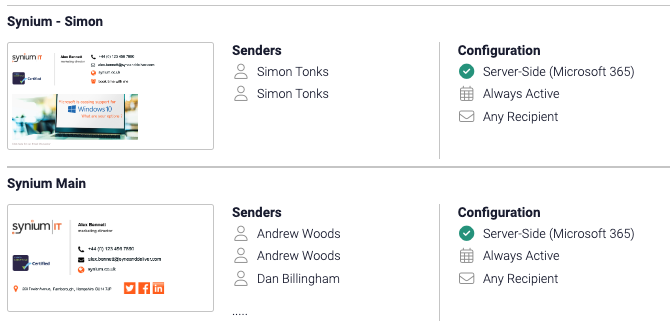
Exclaimer is a cloud based system that can be linked to your Microsoft 365 accounts and be set to centrally manage all (or some) of your mailboxes – allowing you to standardise on signature design.
Example
“Imagine you have 20 employees, each manually updating their email signature. This can lead to inconsistencies, outdated information, and errors. With centralised management, a single update ensures everyone’s signature is in line with current brand guidelines.”
2. Benefits
Consistency Across the Organisation
Consistent email signatures reinforce the brand in every email sent, from the MD to frontline employees. This is for emails sent from your laptop – but also from your mobile devices (phones and tablets) – which is a huge bonus.
A recent survey showed that 72% of businesses believe consistent branding directly affects their credibility with clients.
Ease of Management
Updates to signatures, such as contact details or branding elements, can be instantly applied across all users without requiring individual updates.
Imagine updating a holiday hours message, or promotional messages—Exclaimer make this a one-step process.
Professional Appearance
Uniform email signatures reflect a polished and professional look, which builds trust with recipients. The inbuilt design tools make signature creation and tweaking very easy. Exclaimer also comes with many different templates for you to start with.
Compliance and Legal Requirements
Centralised control allows easy inclusion of legal disclaimers, which is especially important for regulated industries like finance or healthcare.
For GDPR compliance, a standardised disclaimer can ensure that sensitive information is protected and legal notices are always present.
Marketing Opportunities
Companies can use email signatures as a marketing channel by including banners or calls to action for promotions.
A business running a seasonal promotion can quickly add a banner across all email signatures. Studies show that email signatures can lead to a 10% increase in traffic to promoted content when a banner is used effectively.
3. Why Choose Exclaimer for Centralised Signature Management
Integration with Microsoft 365
Exclaimer works with extremely well with Microsoft 365; it can pull in an individual’s details (Job title; Phone number; Email address; etc) – making it super easy to manage for many people.
User-Friendly Interface
Exclaimer’s easy-to-use dashboard allows admins to create and update signatures without complex coding or design tools.
Advanced Features
Exclaimer offers signature segmentation, where different signatures can be created for specific departments (e.g., sales, marketing) while retaining brand consistency.
The marketing team’s signatures can include links to a recent blog post, while customer service signatures focus on contact information.
4.Conclusion
So, if you want to improve how your organisation manages it’s email signatures – and have the same email signature on emails from Laptops and mobile devices, you will really like Exclaimer.
Plus, at just £1.25 per user per month (Yes ! just One Pound 25 pence) – and a small setup fee (£200) – for us to connect your 365 accounts to Exclaimer – it is a very affordable solution that can have a hugely positive effect on your company communications.
LEARN MORE
If you want to learn more about how Exclaimer could benefit your business by strengthening brand image and simplifying signature management, give me a call, or fill in the form below – or check out this video from Exclaimer to explain what it is:
