





24 Apr Make Your Business Look More Professional with One Simple Email Signature Tool
Keeping It Consistent (Without the Headache)
If you’ve ever had to chase staff to update their email signatures, you’ll know how frustrating it can be. Different fonts, outdated job titles, missing phone numbers—it’s messy, unprofessional, and bad for your brand.
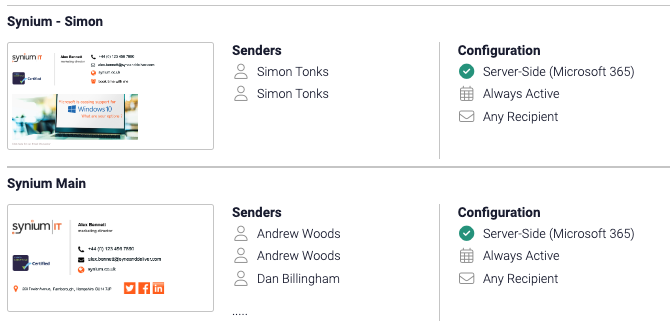
That’s where a tool like Exclaimer comes in. It connects directly to your Microsoft 365 system and lets you manage everyone’s email signatures from one place—no faff, no manual updates, just simple consistency across the board.
Picture this:
You’ve got 20 people sending emails every day. Without a central system, each one might be using a different layout or outdated info. But with Exclaimer, you can update all 20 signatures at once—job titles, logos, banners, legal disclaimers—the lot. It takes minutes, not hours.
What’s In It for You?
Consistency That Builds Trust
Every email your team sends is a reflection of your business. A clean, consistent signature—on both computers and mobiles—makes your business look polished and trustworthy. In fact, 72% of businesses say consistent branding makes them look more credible.
Easier to Manage
Got a new phone number, office hours, or promo? No need to update each person individually. Just make the change once in Exclaimer, and it rolls out to everyone automatically. It’s as easy as updating your website banner—but for your email footers.
Professional Look & Feel
You don’t need a graphic designer or technical skills. Exclaimer comes with ready-made templates and easy tools, so you can build great-looking email signatures in no time.
Tick the Legal Boxes
If you’re in a regulated industry (like finance or healthcare), legal disclaimers aren’t optional. With Exclaimer, you can ensure every email has the correct disclaimer—automatically.
Free Marketing, Every Day
You can even use your email signature as a mini marketing tool. Want to promote a seasonal offer or your latest blog? Just add a banner or link to the bottom of every email. Studies show this can drive up to 10% more traffic to your offers!
Why Exclaimer?
Seamless with Microsoft 365
The software is linked (securely) to your Microsoft 365 tenant, and can pull in names, job titles, phone numbers – eliminating and need for manual input.
No Tech Skills Needed
It is very easy to learn how to create the different styles – and it comes with many different templates for you to use. Just log in, make changes, and hit save.
Tailored for Teams
You can have different signatures for different teams – but still keep the overall company branding. So, (for example) you could create different signatures for sales, customer service, or marketing, all while keeping the brand look consistent.
Final Thoughts
If you’re after a simple, affordable way to make your emails look more professional, Exclaimer is a no-brainer. Your staff get great-looking signatures on both laptops and mobiles—and you stay in full control, without needing to get stuck in the details.
For just a small monthly fee per user (and an a one-off set up fee) you can have great Email signatures across the organisation.
Ready to Take a Look?
Want to see how it works?
If you’re interested in us setting up a demo for your organisation, just give us a call.
