





24 Apr New Version of Outlook is Available

Microsoft is currently rolling out a new version of Outlook for those using Microsoft 365 with several updates to its interface and features. The latest version is designed to provide users with a faster and more organized email experience. The updates include a simplified ribbon, new icons, and a customizable navigation bar that allows users to access frequently used folders and functions with ease. This rollout is happening throughout April, and you will know it is available to you when you see the ‘New Outlook’ switch in the top right:

For me, one of the really cool new features is being able to ‘Snooze’ emails. This is something you have been able to do with the mobile app for some time. If you want to keep your Inbox to a minumum, you can Snooze emails, making them disappear until the specified future date and time (when they will reappear). Very cool.
(and don’t worry – they don’t really disappear, they are simply moved to the ‘Snoozed’ folder until the date you specified.
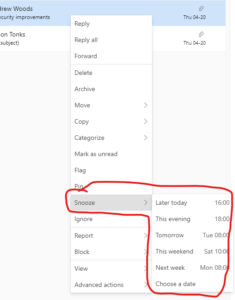
Another nice feature is being able to ‘Pin’ an email. Particularly useful for those who do have quite a few emails in the Inbox – it means you can Pin certain emails to the Top of the pile, making them more prominent.
Microsoft have also improved the ‘Schedule Send’ functionality, making it much simpler to delay sending emails to a specific day/time in the future.
One of the most significant updates is the introduction of a feature called “Focused Inbox,” which separates important emails from less important ones, helping users to prioritize their messages. Additionally, the new Outlook includes a feature called “@mentions,” which allows users to tag specific individuals in their emails for quick attention.
Microsoft has also improved its calendar features with a new “Weather Bar” that displays local weather forecasts, and a “Time Zone” feature that allows users to see multiple time zones in their calendar. The new version also includes an improved “People Card” that shows contact information, organizational charts, and recent communications with specific individuals.
Overall, the new version of Outlook for Windows offers several useful updates that can help users stay organized and increase productivity. With its simplified interface, customizable navigation bar, and enhanced features, it is definitely worth considering for Microsoft 365 users.
Full details can be found here on the Microsoft website.
If you are not using Microsoft 365, and are interested in learning if it right for your organization, please get in touch – we can certainly help:
Main photo from the Microsoft blog post.
