






18 Jul Use Whatsapp ? You definitely need to do this…
Posted at 09:07h
in Blog
On our Helpdesk we have had a couple of instances recently of people’s Whatsapp accounts being compromised.
So, if you are using Whatsapp, you definitely want to activate ‘Two-step verification’. It’s quick and easy to do, and gives you added protection from someone else accessing all your Whatsapp data – which would be bad.
How to activate two-step verification on Whastapp
Step 1: Open Whatsapp
Step 2: Click on the ‘Settings’ icon in bottom right of the screen
Step 3: Click on ‘Account’
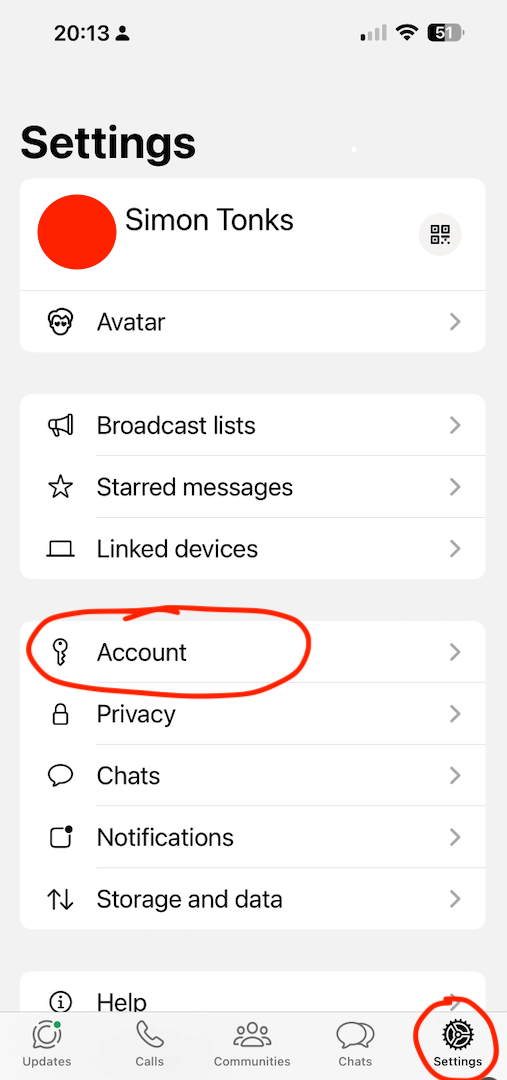
Step 4: Click on ‘Two-step verification’
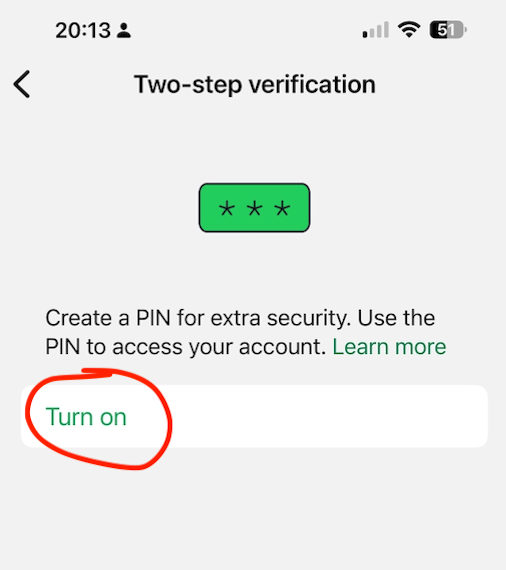
Step 5: Click on ‘Turn On’

Step 6: Enter a memorable 6 digit passcode (make sure it is memorable to you)
Then you are done – told you it was easy.
